How to address a parcel and print your shipping labels
5
min read26 June 2026








To address a parcel correctly, put the delivery address clearly on the largest flat face and a return address on the back or top-left. A readable label is what keeps your orders out of the lost-mail pile.
This guide is for online sellers handling their own despatch. Here, we’ll cover:
A parcel label needs the recipient’s full name and address with postcode, a return address and any carrier barcode or tracking number. Handling marks like ‘fragile’ go alongside, not over, the address.
Keep the address block clear of seams, tape and box edges so it scans first time. Our guide to labelling packages for shipping covers placement and what each carrier expects.
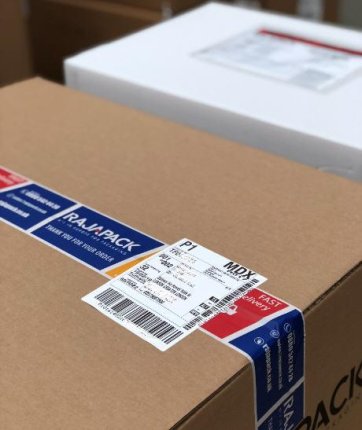
For UK delivery, write the address left-aligned with the postcode on its own line in capitals at the bottom. A clear layout is the single biggest thing you can do to address a parcel that arrives without issues.
Put the delivery address on the largest flat face, roughly central. Knowing how to write an address on a parcel is simple: recipient name, house number and street, town, then postcode, each on its own line.
Add the return address smaller, on the back or the top-left corner of the front, so it’s clearly the sender. A return address means undeliverable parcels come back to you instead of being lost.
Most carriers generate a PDF label from their online system that you print, trim and attach with the barcode flat and uncreased. You can print shipping labels on a desktop printer or a dedicated label printer.
Without a printer, print onto integrated label paper or plain A4, then attach with a clear label pouch or wide tape, keeping tape off the barcode. To print address labels at volume, a thermal label printer is faster and doesn’t need ink.
The main types are integrated labels, address labels and handling labels such as fragile or this-way-up. Each does a different job, and most sellers use a mix.
A label printer isn’t essential at low volumes, but it saves time and ink if you’re posting daily. A label printer for small business use is usually a compact thermal model that prints without ink cartridges.
If you post a few orders a week, plain paper and a label pouch are fine. Past roughly ten parcels a day, a thermal printer pays for itself in time and tidier labels.
Whether you print at volume or by hand, the right labels make despatch faster and cleaner. Browse the range to find integrated, address and handling labels in one place. And our guide on what every online seller needs explores everything an e-commerce business needs for a smooth packing process.
It’s not legally required, but it’s strongly recommended so undeliverable items can be returned rather than lost. Put it smaller than the delivery address, on the back or top-left of the front.
You can handwrite the address, but carrier barcodes and tracking must be printed to scan reliably. Write clearly in capitals and use waterproof ink if the label isn’t covered.
Most parcel labels are around 10 x 15 cm (4 x 6 inches), which is the standard size for thermal label printers. Integrated labels usually sit on an A4 sheet with the label pre-cut.
Place fragile or handling stickers next to the address and on at least two faces, never over the address or barcode. Bright handling labels are more visible than printed text alone.
You need a barcode only if your carrier service includes tracking, in which case it must be printed and uncreased. Untracked stamped post needs only a clear address and the correct postage.